Con 7 cilindri si imita il 7 segmenti degli schermi a cristalli liquidi

from vpython  import *
#------------------------------------------------------------------------------- Parametri
C = color.yellow   # Colore dei cilindri
D = 1              # Dimensione, lunghezza, dei cilindri
R = D/5            # Raggio dei cilindri
#------------------------------------------------------------------------------- Tutto acceso!
SETTE_SEGMENTI = [
    cylinder(pos=vector(0,2*D,0), axis=vector(1,0,0), radius=R, color=C), # 0
    cylinder(pos=vector(0,  D,0), axis=vector(0,1,0), radius=R, color=C), # 1
    cylinder(pos=vector(D,  D,0), axis=vector(0,1,0), radius=R, color=C), # 2
    cylinder(pos=vector(0,  D,0), axis=vector(1,0,0), radius=R, color=C), # 3
    cylinder(pos=vector(0,  0,0), axis=vector(0,1,0), radius=R, color=C), # 4
    cylinder(pos=vector(D,  0,0), axis=vector(0,1,0), radius=R, color=C), # 5
    cylinder(pos=vector(0,  0,0), axis=vector(1,0,0), radius=R, color=C)  # 6
]
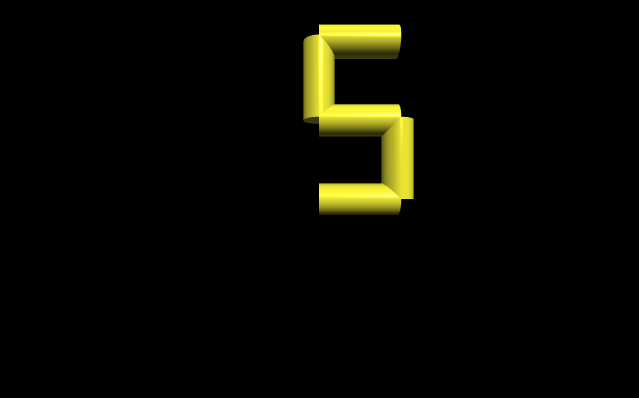
Per animare il 7-segmenti si aggiunge una mappa che per ogni valore da 0 a 9 riporta i segmenti accesi o spenti.
Il main genera la sequenza 0, 1, …, 9, 0, 1, …, 9, 0, 1, … e chiama la funzione che consulta la mappa e aggiorna il 7-segmenti
from vpython  import *
#------------------------------------------------------------------------------- Parametri
C = color.yellow   # Colore dei cilindri
D = 1              # Dimensione, lunghezza, dei cilindri
R = D/5            # Raggio dei cilindri
#------------------------------------------------------------------------------- Tutto acceso!
SETTE_SEGMENTI = [
    cylinder(pos=vector(0,2*D,0), axis=vector(1,0,0), radius=R, color=C), # 0
    cylinder(pos=vector(0,  D,0), axis=vector(0,1,0), radius=R, color=C), # 1
    cylinder(pos=vector(D,  D,0), axis=vector(0,1,0), radius=R, color=C), # 2
    cylinder(pos=vector(0,  D,0), axis=vector(1,0,0), radius=R, color=C), # 3
    cylinder(pos=vector(0,  0,0), axis=vector(0,1,0), radius=R, color=C), # 4
    cylinder(pos=vector(D,  0,0), axis=vector(0,1,0), radius=R, color=C), # 5
    cylinder(pos=vector(0,  0,0), axis=vector(1,0,0), radius=R, color=C)  # 6
]
#------------------------------------------------------------------------------- Mappa
VALORE_SEGMENTI = [
    [True , True , True , False, True , True , True ], # 0
    [False, False, True , False, False, True , False], # 1
    [True , False, True , True , True , False, True ], # 2
    [True , False, True , True , False, True , True ], # 3
    [False, True , True , True , False, True , False], # 4
    [True , True , False, True , False, True , True ], # 5
    [False, True , False, True , True , True , True ], # 6
    [True , False, True , False, False, True , False], # 7
    [True , True , True , True , True , True , True ], # 8
    [True , True , True , True , False, True , False]  # 9
]
#------------------------------------------------------------------------------- Funzione
def aggiorna_stato(valore):
    for segmento in range(7):
        SETTE_SEGMENTI[segmento].visible = VALORE_SEGMENTI[valore][segmento]
#------------------------------------------------------------------------------- MAIN
x = 0
while(True):
    rate(1)
    aggiorna_stato(x)

    x += 1
    if(x >= 10):
        x = 0